
Looking for practical security steps you can take for your project? Set up the security baseline for your project in one minute >
|
html PUBLIC "-//W3C//DTD HTML 4.0 Transitional//EN" "http://www.w3.org/TR/REC-html40/loose.dtd"> What began as a personal experiment quickly became a global open source project with extraordinary momentum. OpenClaw is a personal AI assistant that runs on users’ devices and connects with the messaging channels they already use. Started by Peter Steinberger as a weekend project in November 2025, its GitHub repository has grown to approximately 388,000 stars, 81,000 forks, and more than 80,000 commits by August 26, 2026. In this video interview, filmed just six months into the project, creator Peter Steinberger and several OpenClaw maintainers discuss managing a surge of pull requests, rethinking contributor trust and code review, addressing software supply chain risks, and balancing powerful agent capabilities with security. They also share security lessons from the GitHub Secure Open Source Fund and the value of connecting with maintainers facing similar challenges. Watch the full video above, then explore the key lessons below. People in this videoThe following maintainers shared their experiences maintaining and securing OpenClaw.
Here are the top 10 lessons that we took away from the conversation. Lessons 1–3: How AI changed contributions and community1. Pull requests became prompt requestsOpenClaw’s maintainers found themselves managing thousands of pull requests and issues, with some contributors opening hundreds of pull requests at once.
The challenge shifted from attracting participation to finding valuable contributions amid a flood of activity that could overwhelm human review. 2. Keep the door open for new contributorsOpenClaw’s maintainers wanted the project to be welcoming to new participants, whether they were first-time open source contributors, non-developers solving a specific problem, or people using AI agents to help. Rather than dismissing imperfect contributions, they looked for promising ideas and worked with contributors to refine, rewrite, or complete the final changes themselves.
Some of the first-time contributions that were merged came from people without a development background. They used an agent to create a pull request, and worked with maintainers to finish the change.
3. Agents save time but make it harder to sign offThe maintainers described two very different outcomes from the same technology: agents can help people reclaim time, but they can also make it harder to stop working.
Agents are neither good nor bad for work-life balance. But they amplify both the opportunity to do more and the importance of knowing when to step away. Lessons 4-6: How maintainers adapted4. Earn trust by finding where you can add valueThere was no single path to becoming an OpenClaw maintainer. Some contributors arrived through security work, others through integrations or community participation, but the common thread was finding a way to add value and taking ownership.
5. The new trust signal is showing your workAs contribution counts became less informative, the team identified evidence that could help a pull request stand out: agent transcripts, screenshots, testing, and an explanation of the contributor’s thinking.
The important question was not simply whether a human or an agent wrote the code. It was whether the contributor understood the feature and had considered how it interacted with the rest of the project.
6. Maintainers are reviewing agent code with agentsMaintainers increasingly relied on AI tools to help review AI-generated contributions, while also taking a more hands-on approach to improving submitted code.
Lessons 7–9: Security challenges7. Reputation became an attack surfaceContribution history itself could be manipulated. OpenClaw’s maintainers saw people duplicate existing pull requests, and Vincent Koc explains why.
Peter described a company using an automated pull request to promote their product. The team had to identify duplicate work and determine which pull request was the original. The code was not the only thing the project needed to evaluate. Maintainers also had to reconsider the social signals they used to decide what, and whom, to trust. 8. “Safe by default” depends on who you askWhat feels safe to one user may feel unnecessarily restrictive to another. The tradeoff was clear in practice. Tighter workspace restrictions generated user complaints, while fewer restrictions could expose the project to security incidents.
Secure defaults must account for an agent’s capabilities, what users understand, and what a particular environment is prepared to allow. 9. Know who maintains your dependenciesRecent supply chain attacks pushed the maintainers to think more carefully about both the dependencies they relied on and their relationship with the projects behind them.
Lesson 10: How the GitHub Secure Open Source Fund helpedParticipants described the GitHub Secure Open Source Fund as both a security learning experience and a way to connect with maintainers confronting similar, often overwhelming, problems.
The program provided greater awareness of security practices and helped participating maintainers understand how to prompt agents.
Vincent emphasized the value of meeting other maintainers who were experiencing the same challenges of securing open source projects. The program gave participants a community they could tap into and learn from as those challenges continued. Continue the conversationWatch the full conversation to hear how OpenClaw’s maintainers are adapting when contributions scale faster than the human systems used to review, secure, and sustain them. OpenClaw participated in Session 4 of the GitHub Secure Open Source Fund. To learn more, read What 50 open source projects taught us about security in the AI era. Applications for the GitHub Secure Open Source Fund are now open . If you’re maintaining an open source project, apply to learn from security experts, connect with fellow maintainers, and strengthen the security of your project. Head over to the GitHub Community and ask the maintainers what it’s really like building the fastest-growing open source project in GitHub history! Thank you to all GitHub Secure Open Source Fund PartnersTogether, we are helping secure the open source ecosystem for everyone!
Funding Partners:
Alfred P. Sloan Foundation, American Express, Chainguard, Datadog, Herodevs, Kraken, Mayfield, Microsoft, Shopify, Stripe, Superbloom, Vercel, Zerodha, 1Password
Ecosystem Partners
: Atlantic Council, Ecosyste.ms, CURIOSS, Digital Data Design Institute Lab for Innovation Science, Digital Infrastructure Insights Fund, Microsoft for Startups, Mozilla, OpenForum Europe, Open Source Collective, OpenUK, Open Technology Fund, OpenSSF, Open Source Initiative, OpenJS Foundation, University of California, OWASP, Santa Cruz OSPO, Sovereign Tech Agency, SustainOSS
|
|
html PUBLIC "-//W3C//DTD HTML 4.0 Transitional//EN" "http://www.w3.org/TR/REC-html40/loose.dtd"> I might be biased, but I think Dependabot is pretty amazing. It helps keep my projects up to date, ensuring I’m always using secure libraries. But because there’re frequently new vulnerabilities, there’re frequently new pull requests from Dependabot. Sometimes it’s a minor version bump. Sometimes it’s a major version upgrade. Sometimes everything will work just fine. And sometimes… well, every single developer has been caught by a breaking change. How can we best triage these pull requests? The work isn’t particularly difficult per se, but it certainly is repetitive. It’s the perfect task to offload to Copilot! With GitHub Copilot app automations , you can hand off that first round of review. Instead of manually inspecting every Dependabot pull request, you can create an automation that reviews open pull requests, groups them by risk, verifies CI status, and delivers a summary before your day begins. Follow the steps below to build a daily Dependabot triage automation. Step 1: Create a new automationFrom the GitHub Copilot app, create a new automation . You’ll configure two things first:
Available trigger options include:
For recurring maintenance tasks like Dependabot reviews , a daily schedule is often a good choice. For example, you might schedule it to run before your workday begins so the results are waiting when you log in. You can also choose whether the automation runs in the cloud or on your local machine. Step 2: Describe the task in natural languageNext, tell Copilot what you want it to do. For example:
Because the prompt uses natural language, you can customize it to match your team’s workflow. Step 3: Select the repositoryChoose the repository or project the automation should analyze. Once you’ve selected the repository, create the automation. If you want to test it immediately instead of waiting for the scheduled run, choose Create and Run . Step 4: Review the resultsWhen the automation finishes, Copilot returns a summary instead of a list of individual pull requests. For example, it might:
Rather than interrupting your morning with dozens of small decisions, you can quickly identify which updates are ready to merge and which deserve closer attention. Step 5: Continue the work in a Copilot sessionIf one of the updates requires additional work, you can continue directly from the automation results. For example, if the summary identifies a major framework upgrade, you can start a new Copilot session from the results and ask Copilot to help complete the migration. Because the session starts with the automation’s context, you don’t have to gather the information again. Review previous automation runsEvery automation run is saved, making it easy to see:
Having a history of each run makes automations transparent. You can always review what happened instead of treating them as a black box. Turn repetitive work into background workDependabot triage is a good example of the kind of recurring task that’s well suited for automation. You describe the workflow once, choose when it should run, and let Copilot perform the repetitive steps automatically. If you’re just getting started with automations, begin with a task you already perform on autopilot. Let Copilot handle the routine work so you can spend your time on the decisions that require your expertise. Ready to automate your next recurring task? Create your first automation in the GitHub Copilot app > |
|
html PUBLIC "-//W3C//DTD HTML 4.0 Transitional//EN" "http://www.w3.org/TR/REC-html40/loose.dtd"> A language model can perform well on a clean benchmark and still struggle with the cases that matter in production. Benchmarks and curated datasets are useful when prototyping an LLM-based system. They help teams compare models, test an initial prompt, and determine whether an idea is technically plausible. But as a system moves closer to production, the evaluation problem changes. Real inputs are often ambiguous. Labels may be inconsistent. Important context may be missing or truncated. The evaluation set may not reflect the production distribution. Edge cases that rarely appear in benchmarks can become common sources of failure. Even when offline metrics improve, those results may not translate cleanly into production behavior. We encountered these challenges while evaluating an LLM-based system designed to reduce false positives in GitHub secret scanning. Secret scanning identifies credentials such as tokens and keys that may have been committed to a repository. Because some candidate strings resemble secrets, but don’t actually represent real credentials, developers may spend time investigating alerts that don’t require remediation. Rather than determine whether an LLM could classify a string correctly, we needed to understand whether the system could reduce noisy alerts while preserving enough recall to remain safe for a security workflow.
In this post, we share the practices that helped us move from promising prototype results to production. The lessons apply broadly to LLM-powered systems in code analysis, developer tools, security, data analysis, and other production workflows.
1. Start with the product decision, not the modelWhen an LLM system doesn’t perform as expected, the first instinct is often to adjust its technical components. Teams may rewrite the prompt, add context, introduce another reasoning step, adjust the surrounding pipeline, or switch models. Before making any of these changes, they should define the decision the evaluation is meant to support. For our secret-scanning work, we asked: Can the system reduce false positives while preserving enough recall to be safe in a production security workflow? To answer this question, teams must decide which mistakes are acceptable, which metrics should drive the product decision, and which guardrails must remain within their defined thresholds. In secret scanning, incorrectly suppressing a real credential can be more consequential than asking a developer to review an additional alert. We therefore did not treat precision and recall as equally interchangeable metrics. Our primary objective was to reduce false positives and improve precision. Recall served as a safety constraint: an experiment could advance only if any decrease remained within a predefined acceptable range. This gave us a clear way to evaluate tradeoffs. We selected the configuration that achieved the strongest false-positive reduction while satisfying the recall requirement and meeting our operational guardrails. We organized the evaluation criteria into three levels: Primary outcomeThis measured the user benefit we were trying to improve:
Safety constraintThis prevented an apparent improvement from introducing unacceptable security risk:
Operational guardrailsThese determined whether the result was practical to deploy:
This distinction prevented us from treating every metric as interchangeable. A change that reduced false positives but significantly lowered recall wasn’t automatically an improvement. Neither was a change that improved quality while making the system too slow, expensive, or difficult to integrate.
Consider two hypothetical experiment results:
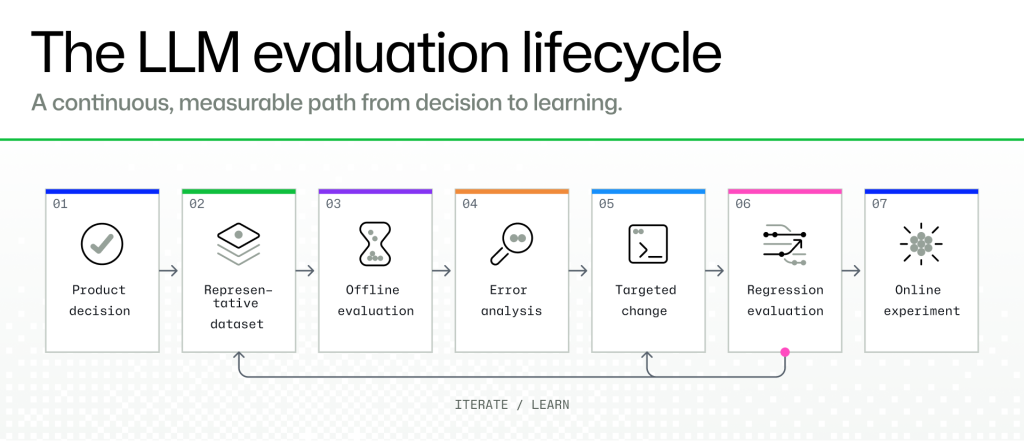
Experiment A may look stronger if precision is viewed in isolation. Experiment B is more aligned with the product goal because it improves the developer experience without violating the recall guardrail. Before evaluating an LLM system, decide what success means for the user and which guardrails the system must respect. We want to generate evidence that supports a product decision. 2. Treat offline evaluation like integration testingAn LLM-based system continues to change after its first successful evaluation, so evaluation should not be a one-time exercise. Teams revise prompts, adopt new models, change how inputs and context are constructed, and refine the surrounding business logic. Any of these changes can improve the system, introduce a regression, or shift its behavior in an unexpected way. For that reason, we treated offline evaluation similarly to an end-to-end integration test. We reran it whenever we made a meaningful change to the prompt, model, input construction, or broader system logic. The evaluation also needed to be repeatable enough that each new result could be compared against a known baseline. For every run, we recorded the prompt, model, dataset version, and system configuration. This made it possible to answer questions such as:
Without this discipline, teams can easily compare results generated under different conditions and attribute an improvement to the wrong change. Change one major variable at a timeRepeatability alone is not enough. Experiments also need to be designed so that the cause of a result is clear. We changed one major variable at a time and compared each run against a known baseline. For example, we evaluated a prompt revision separately from a model upgrade before testing the two together. This mattered because even small prompt changes could shift model behavior, while a model upgrade could affect quality, cost, latency, or output consistency. If both changed in the same experiment, we would not know which one caused the improvement or regression.
We treated prompts and evaluation configurations like code. We versioned them, recorded what changed, kept previous configurations reproducible, and made rollback possible.
The values in the evaluation run tracking table above shown are hypothetical and included only to illustrate how evaluation runs can be tracked and compared. Test model upgrades regularlyWhen an LLM system underperforms, developers often respond by adding more instructions to the prompt. Sometimes that helps, but not always. For example, the prompt may be carrying complexity that comes from the model itself. A stronger model may perform better with a simpler prompt than an older model does with extensive tuning. Simpler prompts are also easier to understand, test, and maintain. Model upgrades still need careful evaluation. A new model may improve performance in one category while introducing regressions elsewhere. It may also affect cost, latency, output formatting, or compatibility with the existing pipeline. The evaluation process should be inexpensive and repeatable enough that testing a new model becomes routine. Any meaningful change to the prompt, model, or pipeline should go through offline evaluation before reaching production. 3. Keep offline evaluation close to productionAn offline evaluation is only useful when it resembles the task the system will perform in production. In a secret-scanning workflow, the model is rarely evaluating one clean, isolated value. It may need to assess a specific candidate alongside surrounding code and other information that is relevant, incomplete, or potentially distracting. Differences in how that information is presented can materially affect the result. Our offline evaluation therefore needed to preserve the important characteristics of the production task, including:
Even small differences can skew the results. A cleaner dataset may exclude ambiguous cases, provide more complete context, or remove nearby values that could distract the model. Consider a simplified example:
Suppose This kind of failure is easy to miss when evaluation examples contain only one obvious candidate. It surfaced because the offline evaluation preserved some of the ambiguity and distractions found in real secret-scanning workflows. The closer the offline pipeline is to the production pipeline, the more useful the evaluation becomes. When the two differ, a strong offline score may simply reflect an easier problem than the one being deployed. 4. Treat production labels as signals, not unquestionable truthProduction data can make an evaluation more representative, but its labels often capture workflow outcomes rather than reliable ground truth. A dismissed or resolved secret-scanning alert, for example, does not necessarily represent a false positive. A developer might resolve an alert because:
These outcomes may look similar in product data while representing different ground-truth states. Before using production labels, ask:
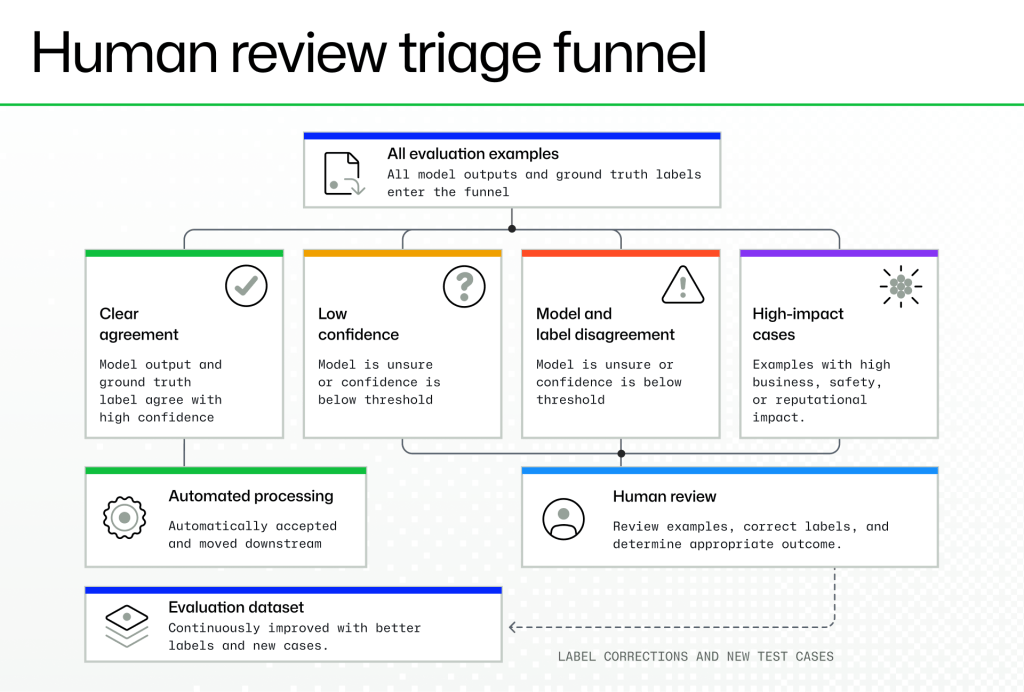
For important or ambiguous subsets, you may need to complete a manual review. You’re not trying to eliminate every imperfect label, but you need to make sure the evaluation data is accurate enough to support the decision being made. 5. Use synthetic and open datasets to fill coverage gapsRepresentative production data may be limited, sensitive, or unavailable early in development. Synthetic examples, academic benchmarks, and open datasets can help developers bootstrap an evaluation and expand coverage, but these examples should supplement rather than stand in for production-like data. With that in mind, synthetic examples can greatly help fill in the gaps for testing cases that are rare or difficult to collect, such as ambiguous inputs, missing context, unusual formatting, and underrepresented failure patterns. A list of credential strings, for example, can test whether a model recognizes common formats, but it cannot fully evaluate how the model reasons about a candidate within real code. We adapted external examples to match our task and reviewed labels that did not align with our product definition. We also used realistic failure patterns to create targeted synthetic cases involving nearby credential-like values, test code, placeholders, indirect references, and missing context. 6. Use error analysis to find what aggregate metrics hideAggregate metrics tell you whether a system improved overall. Error analysis tells you what to change next. A higher precision score doesn’t reveal whether the remaining errors come from ambiguous inputs, poor prompt framing, missing context, noisy labels, or a narrow dataset. To understand those problems, inspect the failures. We reviewed samples of false positives and false negatives and grouped them by their likely source: the model, prompt, input, pipeline, dataset, or label. The recurring issues included several already discussed, such as reasoning about the wrong candidate, missing context, and labels that did not match the evaluation definition. Each category suggested a different response. Reasoning about the wrong value pointed to prompt or input framing, missing evidence pointed to context construction, and incorrect labels required data cleanup. Repeated domain-specific ambiguity could indicate the need for a clearer product policy or a dedicated evaluation category. Manually reviewing dozens or hundreds of examples takes time, but it often leads to faster progress. Once a recurring failure pattern is clear, the team can make a targeted change and measure whether it solved the problem. A useful question for each error is: Did this failure come from the model, prompt, input, pipeline, dataset, or label? That classification turns a vague quality problem into a concrete engineering task. 7. Use LLM-as-judge to focus human reviewReviewing every evaluation example manually may not scale. LLM-as-judge can reduce that burden by classifying clear cases, identifying potentially mislabeled examples, and prioritizing ambiguous cases for human review. Because the judge can also make mistakes or agree with another model for the wrong reason, its output should be treated as another prediction rather than ground truth. A safer pattern is to use the judge for triage:
Used this way, the judge concentrates human attention on the cases where review is most likely to change the outcome.
8. What secret scanning taught usOur goal was to reduce false positives while preserving recall in a security-sensitive workflow. Offline evaluation gave us a controlled way to compare prompt, model, input, and pipeline changes before beginning online experimentation. Through repeated evaluation and targeted error analysis, we reached a 95% reduction in false positives on the evaluated offline dataset while keeping recall within our defined guardrail. More importantly, we understood how the result had been produced: the evaluation reflected the production task more closely, changes were measured against reproducible baselines, and the remaining failure patterns were documented. Offline evaluation did not prove how the system would behave in every production scenario. It provided enough structured evidence to justify moving to online experimentation with clearly understood risks and guardrails. Checklist: Before moving an LLM system toward productionUse this checklist to assess whether your evaluation provides enough evidence to move the system forward. Work through each section to confirm that the goals, data, experiments, and remaining production risks are clearly understood. Product Goals
Data and Labels
Evaluation Rigor
Error Analysis and Production Readiness
Evaluate before you trustAs LLM-based systems move into production, evaluation should become part of the regular engineering workflow. A strong offline evaluation can show whether the product goal has been met under representative conditions, where uncertainty remains, and whether the system is ready for a controlled production rollout. Production uncertainty is unavoidable. Evaluation makes it visible, measurable, and manageable. The post How to evaluate LLMs before production appeared first on The GitHub Blog . |
|
html PUBLIC "-//W3C//DTD HTML 4.0 Transitional//EN" "http://www.w3.org/TR/REC-html40/loose.dtd"> More than one in four images on the web’s most popular home pages have alt text that’s missing, vague, or copied from adjacent images.
That’s from WebAIM’s 2026
WebAIM Million
report, which found that alt text,an HTML attribute containing text describing the content of an image, was missing on 16.2% of images across the top million home pages. Among the images that
did
have alt text, another 10.8% provided an undescriptive attribute, such as
While automated tooling reliably flags missing alt text, it isn’t as good at fixing poorly written alt text. Most alt text checkers test whether an accessible name for an image exists, not whether the provided alt text says anything useful about the associated image, and that’s a deliberate design choice: a quality-oriented rule with false positives is a rule teams switch off. So We built an alt text plugin for the GitHub Accessibility Scanner to help improve your alt text. This post covers where we drew the line between what a checker can prove and what it can only suspect, why our worst bug turned out to be a layout problem rather than a parsing one, and what changed once we let a model into the loop. If you’re building automated checks of your own, for accessibility or otherwise, the tradeoffs should transfer. Proving a string is wrong without seeing the picturePresence of alt text is an objective fact; the attribute is there or it isn’t. Quality is often a judgment call. A machine can’t prove whether a sentence adequately describes a picture in context from markup. However, not all quality is subjective. There’s several checks you can perform based on the alt text alone, with no need to consult the image content:
Every one of those is a claim about a string, and that became our dividing line. Five deterministic rules run by default which need no credentials for running AI models or network calls. One opt-in rule calls a model with provided image content and surrounding context, for judgments an alt text string can’t support on its own.
First, we had to determine which images to judge on a scanned webpage. We use Playwright’s role-based locator rather than So, how strict should it be? A quality checker lives or dies on false positives, so we chose closed sets over clever heuristics. The vague-alt rule normalizes a string, then checks it against a curated list of words that carry no information on their own. It fires only on an exact match:
Rules this literal miss plenty of bad alt text. We took the miss over the false positive, because a reliable checker that developers enable beats one that gets switched off. Repetition is a layout problem, not a DOM problem
Repeated alt text presented an interesting problem. Picture a row of five star-shaped icons that each say Our first version walked the images in document order and flagged any run sharing the same normalized alt. It caught things it shouldn’t have. For example, a footer “GitHub” logo and a header “GitHub” logo might sit next to each other in the extracted list but nowhere near each other on screen, so nobody experiences them as a group. What matters is where images land on screen, not where they sit in the markup. So the rule now checks page layout, and only extends a run when the gap between two bounding boxes is small compared to the boxes themselves:
Two details worth noting:
Getting a model to act like a reviewer, not a critic
Deterministic rules only need the alt string. Anything smarter needs to know what the page is about, and none of that is tracked by the image element. Whether
In our optional The link signal matters most, because when an image is a link’s only content, its alt becomes the link’s accessible name. The right alt then names the destination instead of describing the picture. One caution: The plugin only records that an image sits inside a link. We don’t check whether it’s the link’s only content, which is the part that actually turns alt into a link name. So right now both cases look identical to the model. That context, the alt, and the image go to a vision model through GitHub Models . Our failure modes were rarely the model misreading a picture. They were the model having opinions. Given perfectly good alt text, our first version of the checker would suggest different alt text, because “could this be better?” is a question a language model always answers yes to. Every image becomes a finding, so the signal disappears. Three changes fixed it:
None of that makes the model unfailingly correct. It makes it consistent enough to iterate against. The repository carries an offline grading harness built from published teaching material: WebAIM , the W3C images tutorial , and POET . The rule and the harness share one prompt, so what you tune offline is what runs in CI. That harness only tests the model’s judgment, though, not the whole pipeline. A case can score perfectly there and never reach the model in a real scan. Sending images to a model is a privacy and cost decisionThe moment a check calls an external model with webpage data, it stops being just a lint rule and requires careful data flow design. A few things follow from that:
One caution, because that list is easy to over-read: findings still carry the real page URL and original HTML into the scanner’s normal reporting pipeline. That’s on purpose, since you can’t fix an image you can’t locate. Redaction narrows what reaches the model and the logs, not what lands in your own issues. And if you set up Azure AI Vision credentials, an optional OCR pre-pass sends image bytes to a second place. Nothing requires Azure, but a data-flow review needs to cover both paths. Cost follows the same shape. In the common case this is one model call per image per scan, which on an image-heavy site dominates the cost of the whole run. That’s reason enough to put it on a schedule rather than on every commit. What this still can’t do
What we’d tell you if you’re building something similarSeparate what you can prove from what you can only suspect, and give them different defaults. Checks that prove something should be cheap, predictable, and on by default. Checks that only suspect something should be opt-in, and should read as a suggestion rather than a verdict. Then, ask what the user experiences rather than what the DOM says. Every gap still open in this plugin has that second shape. We record that an image is inside a link, not that it is the link. We read an attribute, not a computed name. That distance is the real boundary, and a better model doesn’t close it. Deciding what the functionality of an image is for a user who can’t see it still requires human judgment. What automation buys you is making sure that human is giving the right images a second examination. Try the alt-text plugin in your accessibility scanning workflow. If it tells you the wrong thing, please report it. Open an issue with the finding and, if public, a link to the affected page. The post Your alt text passes automated checks. That doesn’t mean it’s any good. appeared first on The GitHub Blog . |
|
html PUBLIC "-//W3C//DTD HTML 4.0 Transitional//EN" "http://www.w3.org/TR/REC-html40/loose.dtd"> On August 17, GitHub experienced an outage that lasted 7 hours and 47 minutes. It disrupted github.com, authentication, GitHub Actions, APIs, pull requests, issues, and Copilot, affecting developers and organizations around the world. If you were trying to ship software that day, we let you down. This was our second significant incident in August, following an actions failure on August 6 . In March and April , I shared the work underway to improve GitHub’s reliability. We have made progress, but these incidents make clear that we must accelerate this work. What happenedOur investigation found that the outage began when traffic reached a new peak, and a critical infrastructure component in our Central US data center failed to scale with it. The resulting capacity pressure spread through our systems, causing authentication failures and disrupting multiple GitHub services. Recovery required several coordinated actions. Teams rerouted traffic, isolated affected infrastructure, and restored services in stages. Most GitHub services recovered earlier that day, but some Copilot services took longer. Errors in those services triggered a client-side retry loop that increased traffic during recovery. We had to mitigate that behavior before we could safely restore traffic. The full root cause analysis includes a detailed technical timeline.
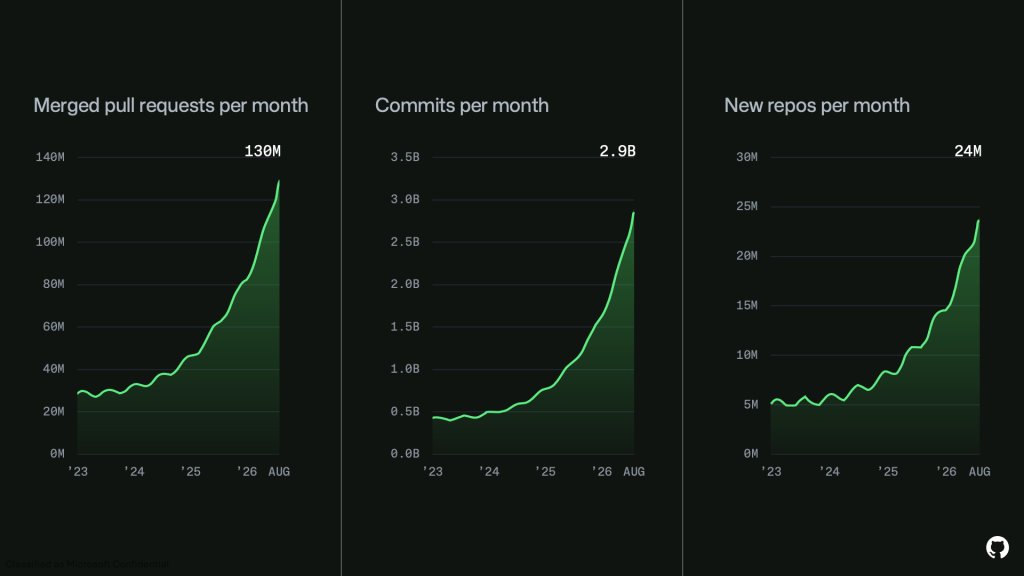
Neither outage was caused by a code or configuration change. Both incidents were capacity failures at their core. We failed to scale critical components before demand exceeded their capacity. Since April, monthly commits have grown from 1.4 billion to 2.9 billion. That growth explains the pressure on our systems, but it does not excuse these outages.
What we have done and what comes nextAs part of the reliability commitments we made earlier this year, we have focused on three priorities: adding capacity, improving efficiency, and removing architectural bottlenecks. We have since added more than 3 million CPU cores, 120 petabytes of high-speed storage, and significant network capacity. We installed as much hardware as available power allowed in our existing data centers while accelerating our migration to Azure.
Today, Azure serves roughly 58% of GitHub’s platform load and half of all Git operations, up from 12% of platform load in May. This expanded footprint has also supported the growth in GitHub Actions job runs shown below.
Azure’s infrastructure and capacity have also accelerated our work to scale the largest monorepos. Our next milestone is an architecture that scales read capacity linearly with the number of readers, enabling unlimited read operations. We will roll it out gradually, beginning with the largest monorepos.
Scale is not our only challenge. As the pace and complexity of change increased, our existing operational practices did not keep up. We have redirected teams and resources toward availability and invested in stronger testing, safer rollouts, better observability, and more effective alerting. We have made progress, but this work is not complete. In addition, we are also isolating critical systems and removing shared dependencies between them. This work is designed to reduce the likelihood of an outage and limit its impact when one occurs. We learn from every outage and add new work to our availability workstream. The August 6 and August 17 incidents led to two immediate changes. First, we are applying consistent retry limits, retry budgets, and variable timeouts across service-to-service interactions to prevent retry storms and cascading load. Second, we are reviewing lower-priority CPU and memory alerts to identify components that could fail during sudden traffic spikes. Our commitment to high availability isn’t just a technical promise. The developer community depends on GitHub to build, ship, and operate their work. That is only possible if you can rely on us, and on August 17, you couldn’t. It is our responsibility to fix that. We’ll earn your trust through the scaling and reliability of the platform. The post The August 17 outage, and the work ahead appeared first on The GitHub Blog . |
|
html PUBLIC "-//W3C//DTD HTML 4.0 Transitional//EN" "http://www.w3.org/TR/REC-html40/loose.dtd"> This is the third post in our GitHub Copilot app for Beginners series. If you’re just joining us, check out, GitHub Copilot app for beginners: Getting started , where we introduced the app and how it helps you work across multiple agent sessions. Our second post goes deeper on working within a session. Here, we’ll look at how to keep all of the requests and work being done on a project organized in one place. If you’ve been following along in this series, you know that real development is rarely a straight line. You fix a bug here, review a pull request there, and chase down a new idea somewhere in between. As you continue to assign tasks to Copilot and create new pull requests, you’ll quickly find yourself with several proverbial balls in the air. Being able to manage everything from one centralized location is key, and that’s exactly why the My work pane exists. Below, we’ll cover how you can use it to manage what’s currently in flight, what’s completed, and what’s next. Exploring the default views for pull requests and issuesWhen you open the My work tab, you’ll see three tabs waiting for you. The first is All, which shows all of your pull requests and issues in one place. This list is automatically filtered based on the projects you’ve touched inside the Copilot app. It’s not every repo you have access to. If there’s a repo you’d like to see here, just create a quick session pointing to that repo, and it’ll show up. Alongside All, you’ll find three more built-in views:
These give you an at-a-glance sense of what needs your attention right now versus what’s already wrapped up. Creating your own views and filtersThe built-in views are a great start, but you can also create your own. Select New view, and you’ll get the familiar “New view” placeholder name, which you can rename to something like “My issues.” From here, you can build your filter. You can type it out using the angle-bracket syntax you might recognize from GitHub, or use the UI, which is often the friendlier option when you’re getting started.
For your My issues view, you can add a filter for You can also do some quick filtering. Select the filter at the top and you’ll get the same interface. Maybe instead of sorting by Recently updated, you’d rather flip it to Ascending so the oldest items float to the top. From there, save your changes to a brand-new view, update the view you’re currently on, or discard the changes to revert back. Customizing your list and table layoutsBy default, your items show up in a list view, which feels a bit like a set of cards. It’s a clean, approachable way to scan through your work. If you’d like a little more control, switch to the table view. The table unlocks a few extra features you won’t find in the list: choose which columns to display, move them around, and resize them to fit how you like to work. And don’t worry about experimenting: you can always reset everything back to the way it was before, and switch right back to the list view whenever you’d like. Starting agent sessions from issues and pull requestsHere’s where things really come together. You can bring up any item by selecting it, and from there, start a brand-new session on it. Just tell Copilot, “Hey, let’s get to work on this,” it’ll get to work, using the issue as its context. Back in the list view, you can select multiple items at once, choose Actions, and create new sessions from them. This is useful in a couple of ways:
In either case, you can change the repo that the Copilot app uses for its session, which is perfect for those situations where the repo hosting the issue is separate from the one hosting the code. Creating issues and changing your repository scopeNear the top of the pane, you’ll find two more helpful buttons. The first is your repository filter, which is set to All Repositories by default. Remember, even “all” here is automatically scoped to the repos you’ve touched inside the Copilot app. The second is New issue, which lets you create an issue right on the spot. For example, if you want to add a light mode toggle, select Create and you can kick off a brand-new session that starts with that issue as its context. Take this with youThe My work pane gives you a single, centralized place to manage all of your pull requests and issues. You can create custom views, search to find exactly what you need, and quickly assign tasks to Copilot, so you can stay organized and focus your attention where it’s needed most. Learn more by exploring the rest of the videos in this series, or by visiting gh.io/app. We’ll see you in the next post! The post GitHub Copilot app for Beginners: Managing your work appeared first on The GitHub Blog . |
|
html PUBLIC "-//W3C//DTD HTML 4.0 Transitional//EN" "http://www.w3.org/TR/REC-html40/loose.dtd">
When I was in college, I joined the beta for one of the first versions of AI inline completions in VS Code. It felt like a game changer. Since then, GenAI has fundamentally changed software development: hybrid teams where agents and humans work in tandem, with the developer at the center as visionary and orchestrator. We are living in that transition right now.
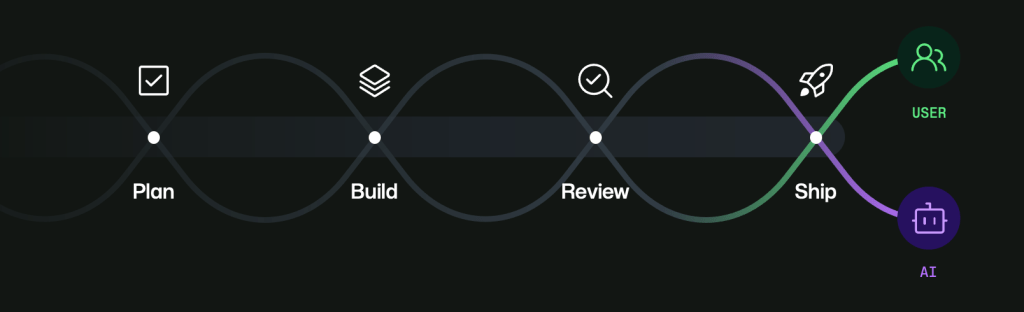
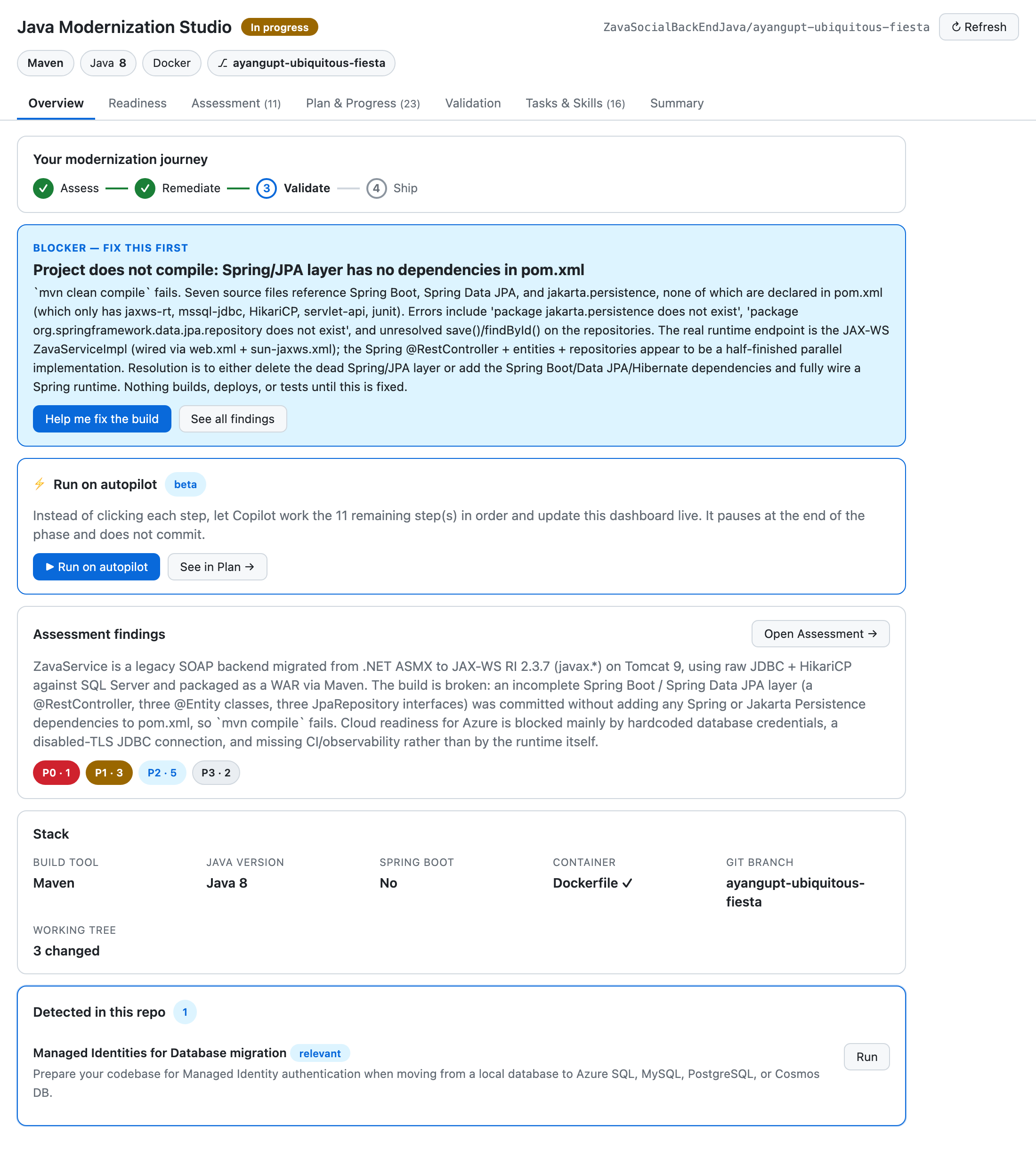
As a natural byproduct of how fast innovation in GenAI has moved, we now have tools to help us plan, build, review, and ship code. But in the current state, many workflows still feel disjointed. Context gets lost across threads and surfaces, and too much time gets spent reviewing agent-generated work. Agents can produce changes faster than any human can review them, and most developer tools were not originally designed for multi-agent orchestration. It becomes easy to lose track of what ran, what changed, what was validated, and what still needs human judgment. The GitHub Copilot app is a major step toward addressing this. One feature in particular that I’ve learned to love and use almost every day is canvases . Canvases let developers and agents interact on a durable, shared surface. Instead of treating chat as the only place where work happens, canvases make work visible, steerable, and approvable as it unfolds. Chat is great for intent, but weak for durable executionI still believe chat is one of the best interfaces we have for intent. It’s where you can think, refine, and direct. It’s fast and flexible, especially when the problem is still ambiguous. But once an agent starts doing real work, chat becomes a long scroll of instructions, logs, pivots, and corrections. The important parts are technically there, but buried: the plan, decision points, validations, and approval moments. If you have to reconstruct all of that from history, you’re already paying a coordination tax. Canvases solve that by giving workflows a home. They make state explicit and persistent. Humans can inspect and guide. Agents can update and progress. Both can stay aligned without constantly replaying context. The first build: Java Modernization StudioOne of the first canvases I built was Java Modernization Studio . Java modernization is exactly the kind of workflow where visibility and governance matter: assessment, planning, migration tasks, validation gates, and readiness to ship. In a chat-only experience, those steps blur together. You can still move forward, but it gets harder to audit and harder to trust at scale, especially with multiple contributors. Teams keep asking the same expensive questions: What stage are we in? What decisions were made? What is blocked? What still needs human approval?
The studio made each phase explicit and inspectable. Instead of parsing narrative history, teams could see operational state directly. Instead of guessing what happened, they could verify it. Human reviewers could focus on high-signal judgments while agents kept execution moving between checkpoints.
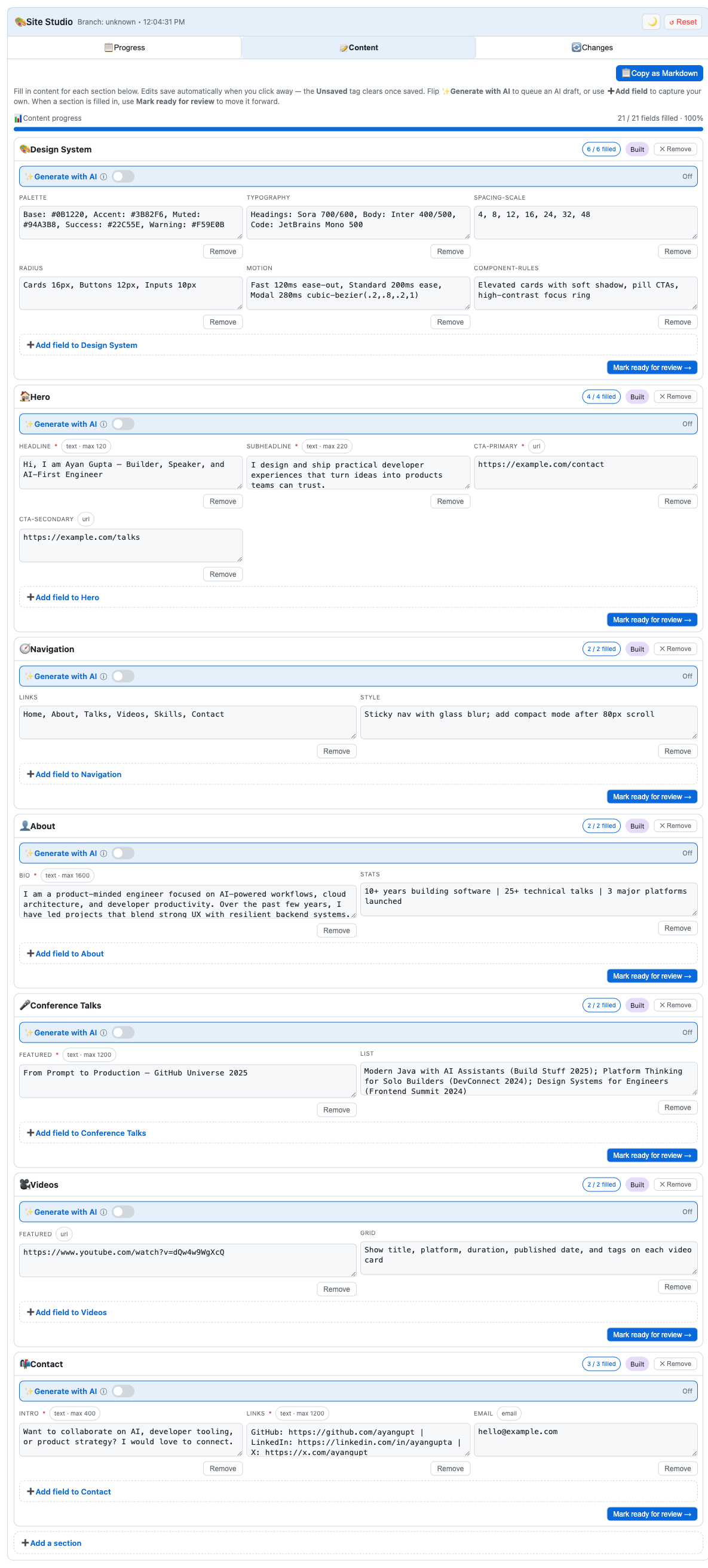
Explore the Java Modernization Studio canvas > The second build: Site StudioAfter that, I built Site Studio for a very different workflow: creating and managing personal site content. It’s content-heavy rather than migration-heavy, but the orchestration challenge is similar: section progress, iterative edits, review loops, and status transitions. In a chat-only flow, content can drift quickly. A section gets revised, then revised again, and confidence drops in what is current. Feedback gets scattered, drafts repeat, and momentum slows because each iteration starts by rebuilding context.
Site Studio keeps that state durable. Section status is visible. Draft values are persisted as work happens. Human review points are explicit. The agent can keep moving while the human can steer, approve, or redirect without losing the thread.
Explore the Site Studio canvas > The repeatable patternAcross both canvases, I found the same repeatable blueprint:
This shifts the model from prompt-by-prompt interaction to durable collaborative workflows. You stop treating each turn like a fresh start and start treating each workflow like a system with memory, structure, and control. Cost and efficiency: yes, canvases are an investmentI also want to be explicit about cost: canvases can be an investment. For instance, Site Studio cost me about 2,000 AI credits, and the modernization canvas cost me about 3,000 AI credits. They take effort to design and shape well. But in the long run, especially for repeated workflows, that investment pays back. Durable surfaces reduce repeated prompting, reduce context loss, reduce unnecessary back-and-forth, and reduce rework. Over time, that can save both time and money while improving trust and throughput. So for me, this is not “spend more tokens for nicer UX.” It’s “invest in better workflow architecture so recurring work becomes more efficient, predictable, and governable.” Available now in awesome-copilotThe canvases I built— Java Modernization Studio and Site Studio — are available in awesome-copilot for anyone who wants to use them, adapt them, or learn from them.
If you are already using Copilot agents, a practical next step is to pick one repeated workflow and build a minimal canvas around it with We’re still early in this transition, but the direction is clear. Agents can accelerate execution. Humans provide vision, judgment, and accountability. Canvases are one way to make that partnership real, durable, and scalable. Build your own canvas with /create-canvas and contribute it back to awesome-copilot > |
|
html PUBLIC "-//W3C//DTD HTML 4.0 Transitional//EN" "http://www.w3.org/TR/REC-html40/loose.dtd"> How many tabs do you have open alongside your pull request? Imagine picking up a new issue in your product’s free-trial onboarding flow: make the “invite your teammates” step optional. Support keeps flagging the step as a friction point as signups increase. Quick win, right? From scoping to deployment, you need answers to these four questions:
Each answer lives in a different tool, so working through the pull request means carrying the same context across four places. GitHub agent apps bring the tools you need to answer those questions to where you’re already working, powered by the same platform and harness as our own Copilot cloud agent . The illustrative walkthrough below shows how you can use services you already depend on, such as Amplitude, Endor Labs, LaunchDarkly, and PagerDuty to answer these questions and complete this request, without ever leaving GitHub. 1. Before you build it
Support says the “invite your teammates” step is annoying for customers who are onboarding with your product, but they haven’t given an indication of who has complained or whether those complaints lead to churn. You’d be right to be skeptical. So instead of opening Amplitude and building a query to confirm your hunch, you ask the
Amplitude
agent right from the
Agents
tab:
The split comes back clear: team users who finish the step are more likely to retain later, while solo users don’t have that correlation. A rescope is now justified: defer the step for solo signups and keep it for teams. Access to product insights is now within GitHub, enabling course correction before any code is written. 2. As you build it
Copilot opens a draft pull request for the change. The implementation also updates dependencies used by the onboarding flow. Instead of waiting for a CI scan to fail later, you ask the
Endor Labs
agent in a comment:
The agent identifies the changed dependencies, checks them for known vulnerabilities and broader package risk, then reports back in the pull request. This time, everything looks clean. Nothing to remediate. Dependency review becomes a proactive check while the change is still in front of you. Much better than remediating a CI scan after it fails. 3. Rolling it out
The previous finding now gets carried through to implementation: solo signups get the optional path, while teams keep the existing one. Because these segments are set at signup, a feature flag can target them directly. Ask the
LaunchDarkly
agent to set it up for you, the same way you’d ask a team member:
The agent creates the flag in LaunchDarkly and adds the code implementation as a commit you review. If the target environment requires approval, it creates an approval request instead of applying the targeting change directly. A human still decides whether the rollout moves forward. Flag setup goes from a second tool, a manual code handoff, and Slack coordination to one pull request comment and a commit you review. 4. Before you ship
Review tells you the code is correct, but whether the service is in a good state for a deployment is a different question. Before merging, you ask the
PagerDuty
agent:
The agent maps the repository to its PagerDuty service, checks for active incidents, reviews the previous 90 days, and compares the files in the pull request with areas involved in past incidents. This time, the risk is low. There are no active incidents and no meaningful correlation with the current changes. The recommendation is to proceed. Nothing dramatic happens, but that’s the point. Checking deploy risk becomes a routine step for your pull requests instead of something you do only when a release already feels dangerous. What changesYou still use Amplitude, LaunchDarkly, Endor Labs, and PagerDuty. But now, you no longer need to carry the context between them, and they’ll all work directly in your GitHub workflows. As work moves from idea to production, developers can bring each service into GitHub when its context or capabilities matter. With agent apps, GitHub becomes the place where developers and agents coordinate what happens next, without developers switching contexts. Try itAgent apps are available from the GitHub Marketplace . Install one, enable it for your organization, and take it for a spin:
Your tools are still your tools. Now, they show up where you are already working: on GitHub. Explore the other inaugural agent apps and start bringing your stack directly into your workflow:
|
|
html PUBLIC "-//W3C//DTD HTML 4.0 Transitional//EN" "http://www.w3.org/TR/REC-html40/loose.dtd"> The GitHub Universe 2026 schedule just dropped, and it’s full of exciting sessions, demos, and panels covering the potential of AI-powered development. If you haven’t registered yet, here’s what you need to know. This two-day event brings together some of the greatest minds in tech, with experts from companies like AMD, Figma, NVIDIA, Coinbase, Anthropic, and OpenAI leading our sessions. They’re covering everything from delegating real work to Copilot and measuring AI at enterprise scale to fine-grained security for MCP servers. You’ll also have the chance to chat with the GitHub team one-on-one, get your questions answered, and even pick up some career advice. Did we mention the Ship & Tell sessions where teams show what they’ve built, and partner booths where you can demo the latest tech?
One thing first: register before August 19 and save $300 with Early Bird passes. Prices go up after that, so if Universe is already on your list, now’s the moment. The best part? You can stack savings with our group discounts. Here’s a sneak peek of some of the sessions we have planned. You can jump to the full agenda right here . Be sure to mark your favorites to build your own personal calendar. Find your flowSome of the best moments at Universe happen heads-down: working through a real problem, configuring something on your own machine, and walking out with a project you can actually use. This year’s catalog leans into that with learnings you can take straight back to your repositories. A few sessions to start with:
Stop prompting, start delegating: Configure Copilot to own the work
Inside GitHub Copilot’s coding harness: Optimizing across every model
Stop waiting on your own pull requests: GitHub stacked pull requests in practice
Find your peopleHallway conversations, a question that reframes your whole approach, the engineer who already solved the thing you’re stuck on. This year’s agenda is filled with sessions for exactly that. Plus, hallway tracks, partner booths, and Ship & Tell sessions where teams show what they’ve actually built. A few sessions worth your time:
Building AI fluency at UPS
Code is the easy part: Building Home Assistant in the open
I made my Octolamp think with GitHub Copilot CLI hooks
Build what’s nextWant to know what’s on the horizon? These are the talks that pull back the curtain on where AI-assisted development is heading.
The view from the labs: What’s next for AI-assisted development
Open pull requests, don’t merge them: Fine-grained authorization for hosted MCP servers
From writing code to managing agents: Scaling 50+ services at GitHub
Cast your vote!Three breakout sessions are heading to Universe this year, but we need your help deciding which one makes it to the main stage. Read through the descriptions, then cast your vote before August 21 . Whichever session wins will also be available on demand, so even if you can’t join us in person, your vote shapes what you’ll get to watch later.
Session 1: Why sketching in code matters more in the age of AI
Session 2: Still open: How AI reshaped open source
Session 3: The human side of AI: How building community drove 94% Copilot adoption
Learn moreWant to get even more out of your GitHub Universe experience? When you register, you can add a Day of Learning pass for $50, which includes access to a full day of learning at GitHub HQ plus one GitHub Certification exam voucher. Already have your agenda planned? You can also purchase a GitHub Certification exam voucher as a standalone add-on for $30 and validate your skills after the event. See you in SF! The post Your guide to GitHub Universe 2026 is here: The schedule just launched! appeared first on The GitHub Blog . |
|
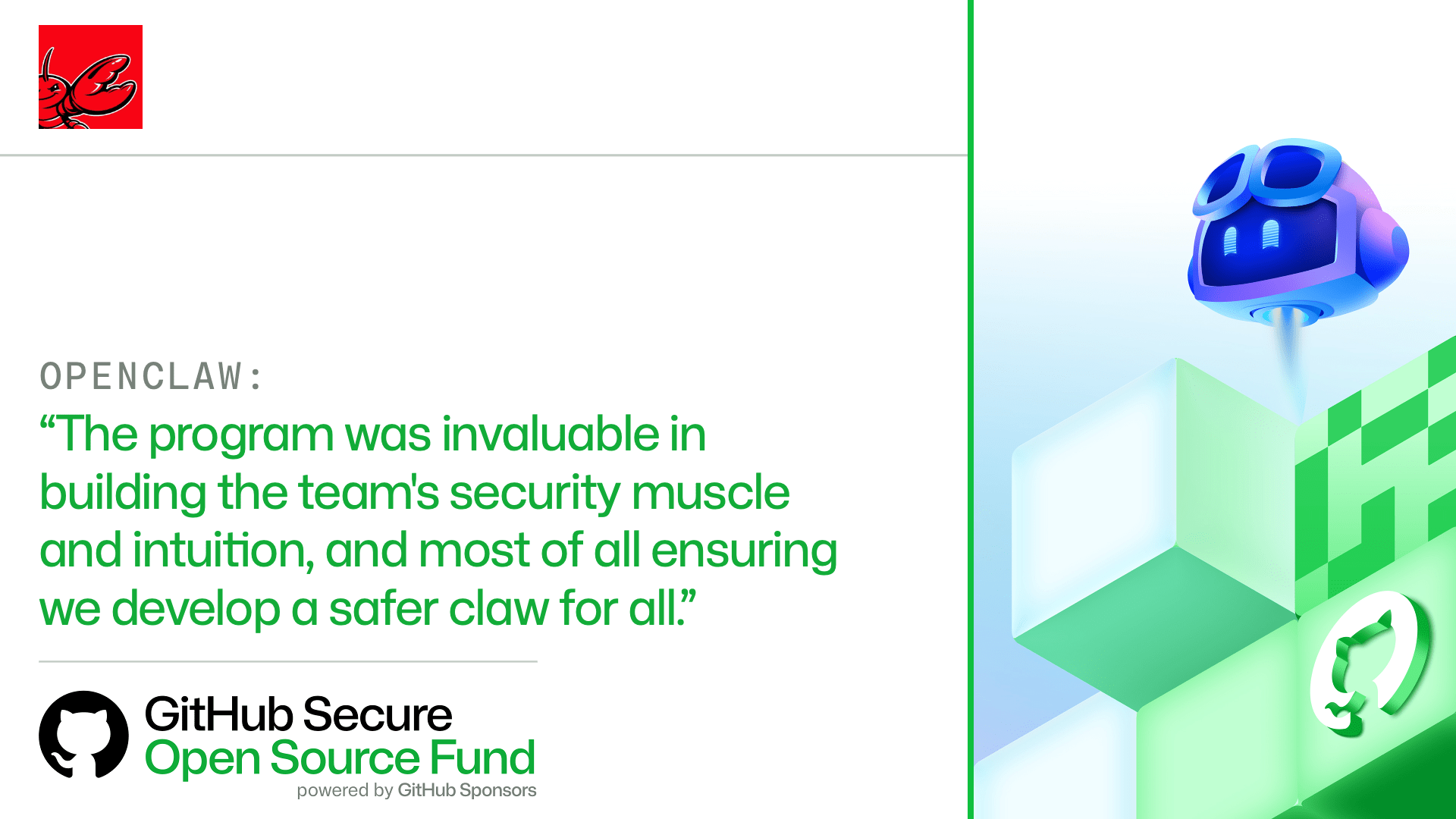
html PUBLIC "-//W3C//DTD HTML 4.0 Transitional//EN" "http://www.w3.org/TR/REC-html40/loose.dtd"> AI is changing the pace of open source development and the security challenges that come with it. Maintainers are reviewing unfamiliar contributions, managing new attack surfaces, and responding to vulnerabilities with limited time and resources. Session 4 of the GitHub Secure Open Source Fund tested a practical response. The Secure Fund invested more than $500,000 across 50 projects , pairing maintainers with GitHub Security Lab experts, GitHub security tools, AI-assisted workflows, and a peer community. One lesson emerged consistently: AI can help maintainers investigate, prioritize, and respond faster. Maintainers still provide the context, judgement, and accountability required to decide what ships. OpenClaw was invited to participate in Session 4 because it is GitHub’s fastest-growing open source project, and its maintainers wanted to strengthen its security posture. By the end of Session 4, OpenClaw developed an incident response plan, expanded its use of GitHub security tooling, audited its GitHub Actions workflows, and strengthened its processes for identifying and responding to security issues.
The maintainers shared:
OpenClaw’s experience reflects the broader story of Session 4. While the specific risks varied across the cohort, maintainers shared a consistent need: the knowledge, tools, and expert support to secure software as AI changed how they built it.
Across the program, maintainers turned that support into concrete security improvements. Projects strengthened established practices, prepared for emerging AI-related risks, and explored how tools like
GitHub Copilot
could support vulnerability triage, threat modeling, code review, and remediation.
The benefits extend beyond individual projects. When maintainers strengthen the security of widely used open source software, they help build a more resilient ecosystem for everyone who depends on it. How the GitHub Secure Open Source Fund worksThe GitHub Secure Open Source Fund links funding directly to measurable security outcomes. The program combines hands-on security education, direct engagement with GitHub Security Lab experts, and a trusted community where maintainers can work through security challenges with their peers. Each session is a three-week sprint and engagement for a total of 12 months. Funding and participation are tied directly to outcome‑driven goals and verified security improvements. The sprint is designed and curated by the GitHub Security Lab , and delivered by security experts from GitHub and our partners. The training is structured into different focus areas per week. These include:
Throughout this program, each project receives $10,000 USD via GitHub Sponsors (which breaks down to $6,000 USD during the sprint and $2,000 USD at six- and 12-month security check-ins). Projects are invited to a new security-focused community and office hours with the GitHub Security Lab , which they can take advantage of during the full 12 months. They also receive security resources to immediately implement in their project and Azure credits for cloud infrastructure.
Where security work happened in Session 4Session 4 focused on improving security across the systems developers rely on every day. The projects below are grouped by the role they play in the software ecosystem. AI, machine learning, and intelligent systems 🤖Caracal • Deep Agents • DocsGPT • LadybugDB • LangChain • n8n-MCP • Nasiko • ONNX • OpenClaw • PageIndex • Scenic • Serena
These projects sit at the intersection of AI, automation, data infrastructure, and machine learning. They increasingly serve as foundational components for modern AI workflows and production deployments. As AI adoption accelerates, security improvements in these projects help establish stronger foundations for emerging AI ecosystems.
Build systems, supply chain, and release tooling 🧰browserslist • CycloneDX Python Library • Cucumber • golangci-lint • JReleaser • postcss • Task
These projects help developers test, validate, package, release, and maintain software across diverse environments. Tools in this group influence everything from software bills of materials and release pipelines to code quality and testing automation.
Core programming languages, runtimes, and foundational libraries 📚Byte Buddy • core-js • FS2 • Gleam • htmx • Pkl • Pyodide • termcolor These projects help define how software is written, configured, executed, and extended. Improvements at this layer flow downstream to thousands of applications and developer ecosystems.
Security improvements in foundational runtimes and libraries can extend downstream to the many tools and applications that depend on them.
Developer tools and productivity platforms ⚒️cheerio • Ciphey • CodeRunner • Hoppscotch • MapStruct • Python Pillow • Proyecto Respira • Readest • ToolJet • Vuetify • Yjs These projects shape the everyday experience of building, testing, collaborating on, and using software. Many serve as widely adopted utilities, applications, and platforms that appear throughout developer environments and application stacks.
Together, this group supports API development, low-code platforms, collaborative applications, content processing, and software delivery workflows. When infrastructure projects become more resilient, the benefits extend far beyond a single application and strengthen entire technology ecosystems.
Web, networking, APIs, and infrastructure services 📊actix-web • aiohttp • Apache Solr • Apache ZooKeeper • etcd • FastAPI • Haraka • Hummingbird • mimetype • Sniffnet • Starlette • UAParser.js These projects form part of the internet’s operational backbone. They handle APIs, networking, search, messaging, service coordination, and distributed systems infrastructure relied on by organizations around the world.
This group includes technologies that sit on the critical path of modern cloud applications and internet services.
AI security as a shared frontierAI-related security questions appeared across projects in Session 4, from machine learning infrastructure and agent frameworks to developer tools and internet infrastructure. At the same time, established security responsibilities did not go away. Maintainers still needed to manage vulnerabilities, secure dependencies, protect release workflows, and prepare for incidents. AI introduced new risks and increased the speed at which maintainers needed to understand and respond to them.
The lesson from Session 4 is clear: AI security is not evolving in isolation. It is becoming part of the broader practice of building secure software. As that shift continues, maintainers will need practical education, trusted communities, and expert support that can evolve with them.
Thank you to all of our partnersWe couldn’t do this without our incredible network of partners. Together, we are helping secure the open source ecosystem for everyone!
Funding Partners:
Alfred P. Sloan Foundation, American Express, Chainguard, Datadog, Herodevs, Kraken, Mayfield, Microsoft, Shopify, Stripe, Superbloom, Vercel, Zerodha, 1Password
Ecosystem Partners
: Atlantic Council, Ecosyste.ms, CURIOSS, Digital Data Design Institute Lab for Innovation Science, Digital Infrastructure Insights Fund, Microsoft for Startups, Mozilla, OpenForum Europe, Open Source Collective, OpenUK, Open Technology Fund, OpenSSF, Open Source Initiative, OpenJS Foundation, University of California, OWASP, Santa Cruz OSPO, Sovereign Tech Agency, SustainOSS
|
Distributed by aarss.com.